
How I Added a Local AI Chat to My Website (No Backend Required)
A few weeks ago I wanted to add an AI assistant to my personal website, something that could answer questions about my experience, my projects and my talks. The obvious path was calling an LLM API, but that meant API keys, a backend, per-request costs and sending my visitors’ questions to a third-party server. Then I found out about the Chrome Prompt API, and everything changed.
In this post I’ll explain what the Prompt API is, its key components, why running an LLM locally in the browser is such a big deal, and how I used it to ship a fully local, bilingual AI chat on my own site.
What is the Chrome Prompt API?
The Prompt API is one of Chrome’s built-in AI APIs. It exposes a small language model – Gemini Nano – directly inside the browser through a global LanguageModel object. No SDK, no API key, no server: the model lives on the user’s device.
A few important characteristics:
- It is experimental. Today it works on Chrome desktop, and for production sites it requires an origin trial token (a
<meta>tag you add to your pages). - The model is downloaded on demand by the browser, only after an explicit user action — your site can’t silently pull down several gigabytes.
- It is designed for small, focused tasks: text generation, summarization, classification and short question answering.
For a personal website, that’s more than enough.
Key components of the Prompt API
Getting into the matter, the API surface is surprisingly small. These are the pieces you actually use:
1. Feature detection and availability()
First you check whether the browser even supports it and what state the model is in:
const state = await LanguageModel.availability({ expectedInputs: [{ type: 'text', languages: ['en', 'es'] }], expectedOutputs: [{ type: 'text', languages: ['en', 'es'] }],});// 'unavailable' | 'downloadable' | 'downloading' | 'available'This single call drives your entire UX. In my case:
available→ the full streaming chat is enabled.downloadable/downloading→ I show a “Activate local AI” button that only starts the download after an explicit click.unavailable/ unsupported → a “basic mode” fallback (more on this below).
2. Creating a session with LanguageModel.create()
const session = await LanguageModel.create({ initialPrompts: [{ role: 'system', content: 'You are Alan\'s assistant…' }], monitor(m) { m.addEventListener('downloadprogress', (e) => updateProgress(e.loaded)); },});Two details worth highlighting:
initialPromptsis where your system prompt goes — the model’s grounding for the whole conversation.- The
monitorcallback lets you render download progress, which is essential since the model is several GB.
3. Prompting: prompt() vs promptStreaming()
prompt(input)resolves with the complete answer.promptStreaming(input)returns aReadableStreamso you can render the answer token by token — much better perceived performance for a chat UI.
One gotcha I hit: some builds emit cumulative chunks instead of deltas, so I merge with a small helper instead of always appending.
4. Session lifecycle: clone(), destroy() and quotas
Sessions have a context window (inputUsage / inputQuota, plus a contextoverflow event). The pattern I use: keep a base session with the system prompt, clone() it for each conversation, and destroy() clones on reset — a “new conversation” costs almost nothing.
Why run a local LLM in the browser?
The advantages that convinced me:
- Privacy by design. Questions never leave the device. For a personal site, I don’t want to handle (or pay for) anyone’s data.
- Zero marginal cost. No API bill, no rate limits on my side, no infra to maintain. My site stays a purely static site.
- Works offline once the model is downloaded.
- No backend. Everything is client-side TypeScript bundled by Vite — the site is still plain HTML/JS/CSS served from cheap hosting.
Being honest about the trade-offs:
- It only works on Chrome desktop today — mobile, Safari and Firefox need a fallback.
- Gemini Nano is small: you can’t expect GPT-level reasoning. You have to design around it.
- It’s experimental, so APIs may still evolve.
Success case: a bilingual AI chat on alangaelrojas.com
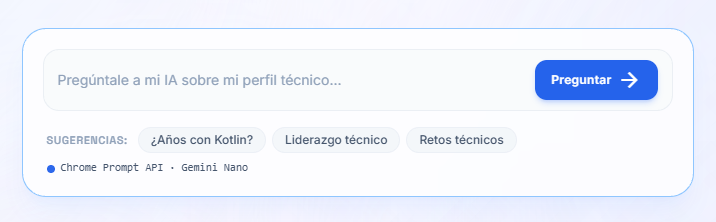
Now the part I’m most proud of — how this works on my actual website. The key insight: I don’t train or fine-tune anything. I use retrieval.
Retrieval instead of training
Nano is small, so I ground every answer with context:
- A local knowledge base written in plain Markdown (
src/knowledge/{es,en}/*.md) — one##block per topic, plus chunks auto-generated from my typed content data (experience, projects, certifications, teaching). - A BM25 retriever (~150 lines) ranks chunks per question — accent-normalized, with Spanish/English stopwords, stemming and title/tag boosting.
- The system prompt injects computed facts (total years of experience, years per technology, current role) so answers about dates are always exact.
- The top ~4 chunks are injected into the user prompt inside a character budget — small models do worse with long context, so this matters a lot.
States and graceful degradation
The whole experience is state-driven from availability(): full AI chat when possible, an explicit “Activate local AI” download button when the model isn’t downloaded yet, and a basic mode everywhere else — the same retriever answers with the most relevant chunks plus a contact CTA. Nobody gets a broken experience.
 |  |
The UX
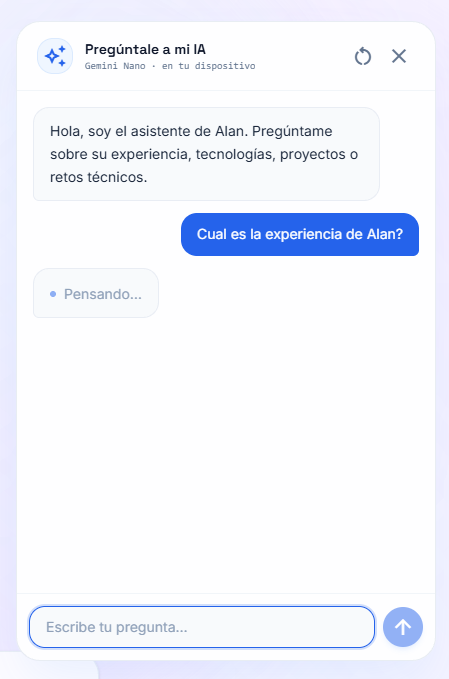
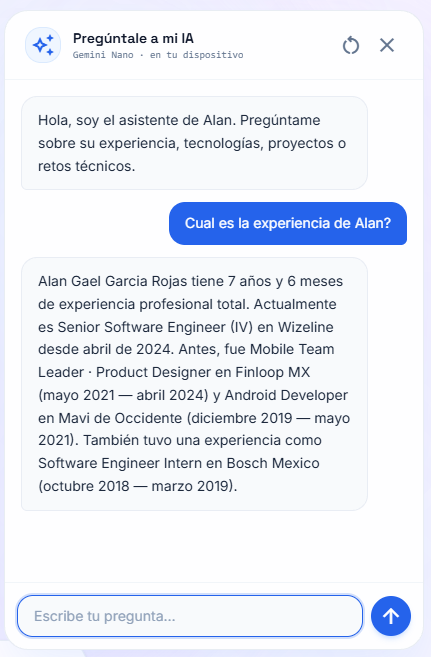
A prompt box in the hero opens a floating chat drawer. When the API is usable, the header CTA even changes from “Let’s talk” to “Ask my AI”. Model output is escaped and rendered through a tiny safe-markdown renderer — never raw innerHTML.
The result: visitors can ask “how many years of Kotlin experience does he have?” or “has he led teams?” and get a grounded, streamed answer — computed entirely on their machine, in both Spanish and English.
Things I learned building this
- Retrieval quality > model quality. Most wrong answers came from bad chunks, not bad generation. Investing in BM25 tuning paid off more than prompt tweaks.
- Design for the fallback first. Most visitors won’t have the model — “basic mode” is the experience for the majority.
- Chunk the streaming defensively. Handle cumulative chunks and aborted reads from day one.
- Small model, small context. A tight prompt budget beats a verbose prompt.
Final thoughts
The Prompt API is still experimental, but it already enables something that felt impossible a year ago: a privacy-friendly AI feature on a static site with zero backend and zero cost. If you have a personal site or a small product where a “lite” assistant adds value, it’s absolutely worth a weekend of exploration.
Useful links
- Chrome built-in AI / Prompt API docs: https://developer.chrome.com/docs/ai/prompt-api
- Try the chat live: https://alangaelrojas.com
- The full implementation (open source): https://github.com/alangaelrojas/alangaelrojas.com
- Enable it locally:
chrome://flags/#prompt-api-for-gemini-nanoand#optimization-guide-on-device-model